Paying by bank transfer
Some stores also take bank transfers. When yours does, the checkout shows a Payment method choice with Card and Bank transfer tabs.
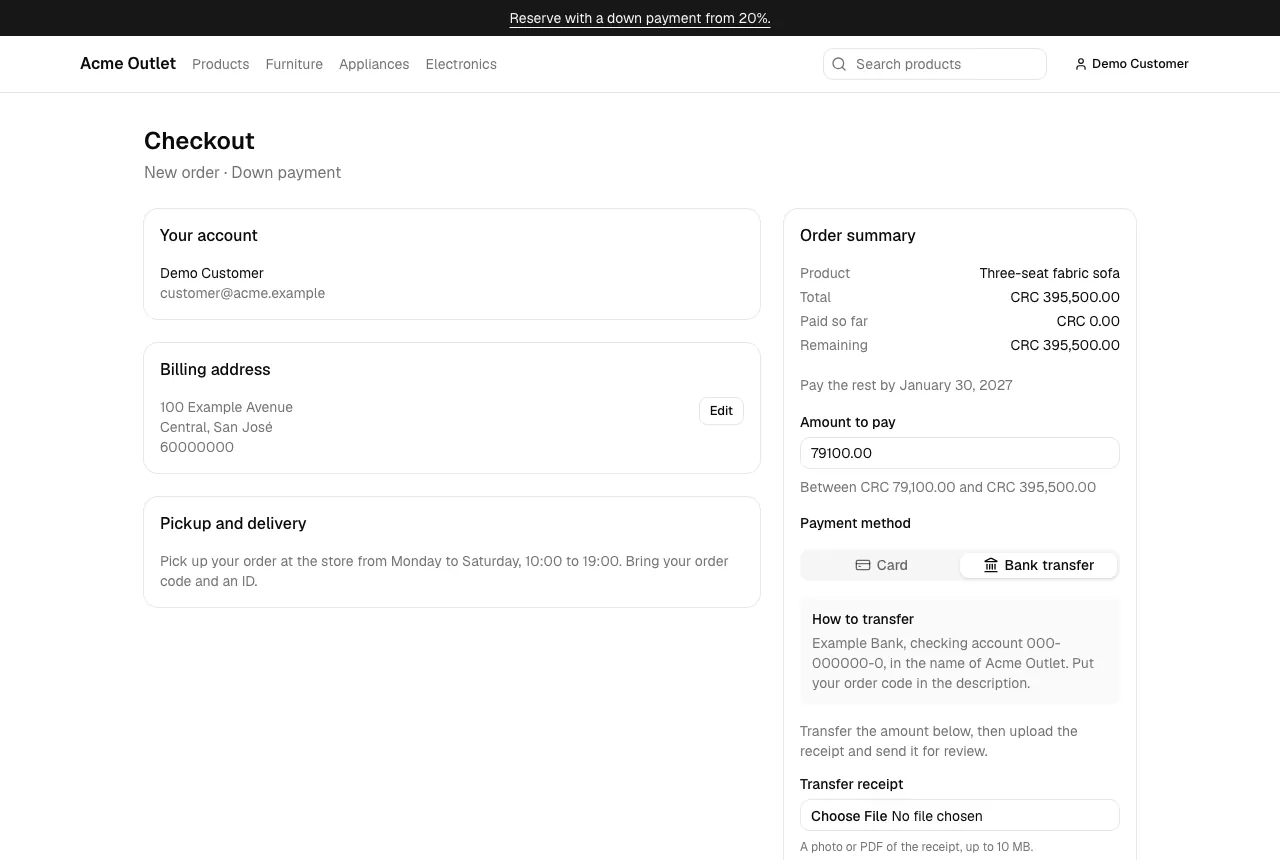
- Set the Amount to pay as for a card payment (a full purchase is always its total).
- Open the Bank transfer tab. How to transfer shows the store’s bank details and instructions.
- Make the transfer from your bank for exactly that amount.
- Under Transfer receipt, choose a photo or PDF of the transfer receipt (up to 10 MB). Wait for “Receipt uploaded: …”.
- Select Send the transfer for review.
You land on the payment’s receipt page with the status In review and a View receipt link to the file you uploaded. While a transfer is in review it already counts towards your order, so a reserved product stays set aside.
The store checks the transfer and lets you know:
- Approved: the payment is confirmed.
- Declined: the store didn’t find or accept the transfer. The payment page shows the reason; fix the problem and send the transfer again with a new receipt.
Each receipt can be sent once. If an upload fails, the checkout says why — for example, “The receipt is too large.” or “Upload a photo (JPEG, PNG, WebP or HEIC) or a PDF.”