Staff and invitations
Staff shows who can use the admin and with which role. It is for store managers and store admins. See Roles and permissions for what each role can do.
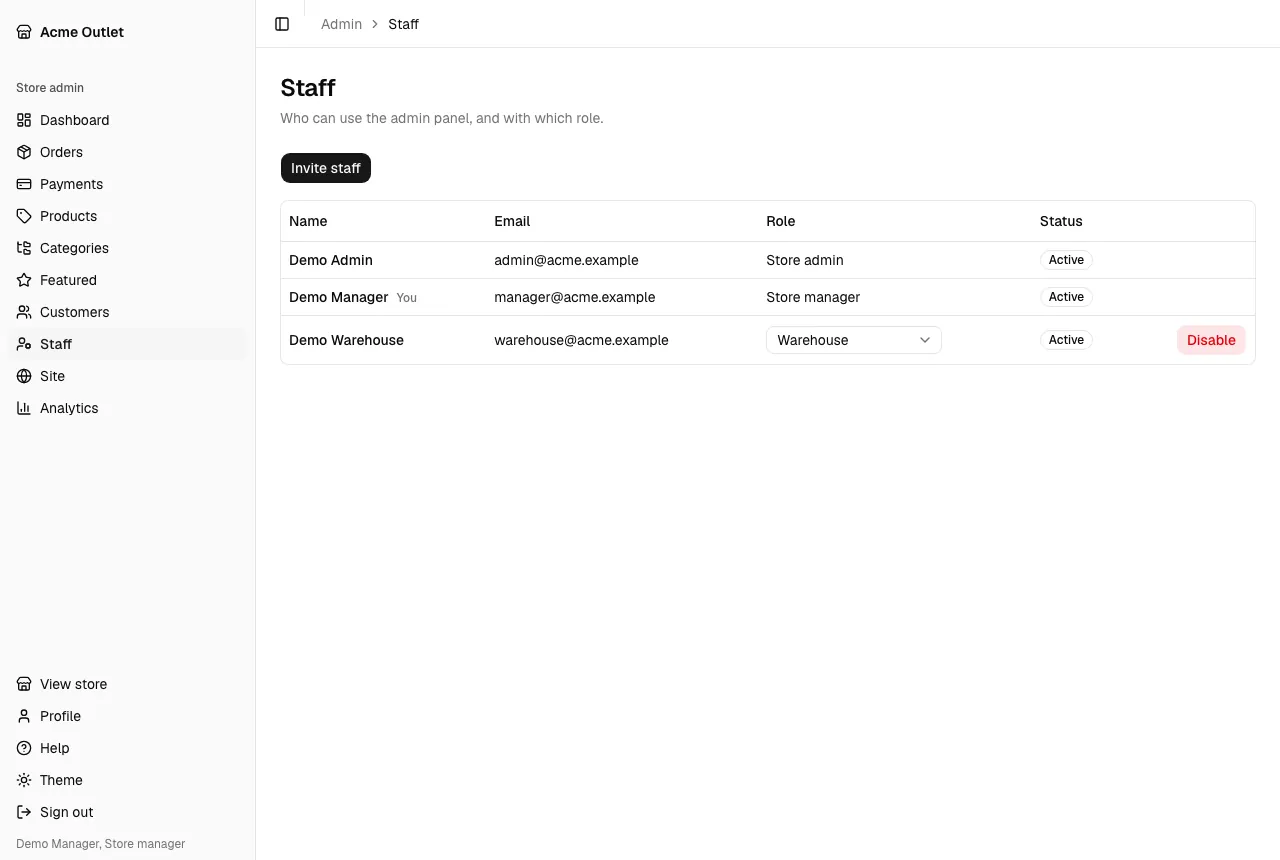
The list shows each person’s Name, Email, Role and Status. Your own row is marked You, and you can’t change it (“You cannot change your own role or status.”). A person who hasn’t set their password yet shows Invitation pending.
Inviting someone
Section titled “Inviting someone”Staff accounts are created by invitation: people can’t register themselves in the admin.
- Select Invite staff.
- In Invite a staff member, fill in their Email, First name, Last name and Role, then select Invite staff.
- The page confirms with “Invitation sent.”
If the email already has an account in the store, a customer’s included, the invitation is refused with “An account with this email already exists in the store.” Use a different email.
What the person receives
Section titled “What the person receives”They get an email from your store with a link to set a password. The link opens Accept your invitation, where they choose a password and select Set password. They then see “Your password is set. You can now sign in.” and sign in with Sign in.
The link works for 72 hours and only once. If it has expired, the page says “This invitation has expired. Ask an administrator to send you a new one.” and you need to resend the invitation.
Pending invitations
Section titled “Pending invitations”Until the person sets a password, their row shows Invitation pending and when the link stops working:
- Expires …: the link still works until that time.
- Expired: the 72 hours have passed and the link can’t be used any more.
Resend or revoke
Section titled “Resend or revoke”On a pending row you can:
- Resend invitation (“Send a new invitation?”): a new link is emailed and works for 72 hours. Older links stop working.
- Revoke invitation (“Revoke this invitation?”): the link stops working and the pending account is removed. You can invite the same email again later.
You can only resend or revoke an invitation nobody has accepted. After the person has set their password, the message “This member already set a password.” appears: use Disable instead.
Changing a role or removing access
Section titled “Changing a role or removing access”- Change the Role of … in the person’s row.
- Disable signs the person out everywhere and stops them from signing in until you select Enable. Their history stays.
A store manager can invite and manage warehouse, accounting and store manager accounts; only a store admin can invite or change a store admin. Rows you can’t manage have no actions.